
PC building is an art form, a craft that requires precision, knowledge, and foresight. Aspiring builders often dive headfirst into the world of components, benchmarks, and RGB lighting, only to encounter pitfalls that could have been easily avoided. The history of PC building is littered with stories of regret, cautionary tales that echo through online forums and communities. Here, we delve into the biggest PC builder regrets, shedding light on six fatal mistakes to steer clear of.

One common mistake that novice builders make is going too budget-friendly and neglecting the importance of future-proofing their rigs. While it may be tempting to cut costs by opting for cheaper components, this shortsighted approach can lead to performance bottlenecks down the line. Investing in a modest video card may seem prudent initially, but upgrading to a higher resolution monitor could expose the limitations of your hardware. It’s crucial to strike a balance between affordability and long-term performance when assembling your PC.

Another pitfall to avoid is purchasing newly released components without thorough research. Rushing to acquire the latest hardware can backfire if the product has inherent flaws that have not yet been uncovered. Waiting for comprehensive reviews and user feedback can save you from potential headaches and ensure that your build is free from unexpected issues. Patience and due diligence are key when it comes to integrating cutting-edge technology into your system.

One fundamental aspect of PC building that is often overlooked is heat management. As components become more powerful, they generate significant amounts of heat that must be dissipated effectively to prevent thermal throttling and hardware damage. Selecting a spacious case with adequate airflow and investing in reliable cooling solutions are essential steps in maintaining optimal operating temperatures for your system.
Timing your component purchases is also crucial to a successful build. While buying parts incrementally may seem financially advantageous, it can hinder your ability to test compatibility and functionality across the entire system. By acquiring all components simultaneously, you can identify any issues early on and take advantage of warranty coverage for potential replacements.

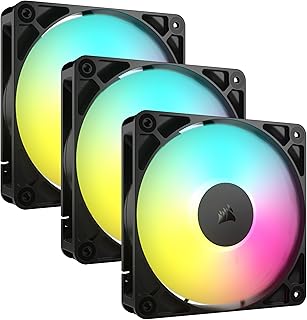
RGB lighting has become a popular feature in modern PC builds, adding flair and customization to the aesthetic. However, enthusiasts should be wary of diving too deep into the RGB hype without considering the maintenance involved. LED failures, color inconsistencies, and software compatibility issues are common pitfalls associated with elaborate lighting setups. Opting for a simpler, RGB-free build can streamline maintenance and ensure a hassle-free experience.

Lastly, the choice of cooling fans can significantly impact the overall user experience. While effective cooling is essential for system performance, noisy fans can detract from the enjoyment of using your PC. Selecting quiet, high-performance fans that strike a balance between cooling efficiency and noise levels is crucial for creating a pleasant computing environment.
In conclusion, navigating the realm of PC building requires careful planning, informed decision-making, and a willingness to learn from past mistakes. By avoiding these six fatal errors, aspiring builders can enhance their building experience and create systems that deliver optimal performance and reliability.
📰 Related Articles
- Optimal PC Placement: Boost Performance and Prevent Dust Buildup
- Optimal Gaming PC Placement: Key Lessons for Performance Maintenance
- Build a Custom Gaming PC for Optimal Performance and Savings
- Valve Enhances Steam Performance Monitoring Tool for PC Gamers
- Top Gaming PC Cases 2024: Performance, Style, and Functionality